Have you ever dived into formatting text in GitHub or a documentation tool, only to emerge feeling frustrated by bizarre spacing and inconsistent styling?
It’s like unlocking a mystery with a puzzle piece that just won’t fit…
That’s where Markdown comes in!
What is Markdown?
Markdown is a formatting language that is relatively simple to use and quick to learn.
No coding experience required!
Markdown is used in GitHub, technical docs, and other note-taking tooks.
Edit README.md with Markdown
If you want steps on creating your first GitHub repository, be sure to check out my full guide here.
In this article we are going to start in your repository with your README.md file already created.
- Open your GitHub repository and click on README.md.
- Click the Pencil (Edit) icon.
- Start writing using Markdown formatting (see cheat sheet below).
- Click Preview to check your formatting.
- Click Commit changes to save.
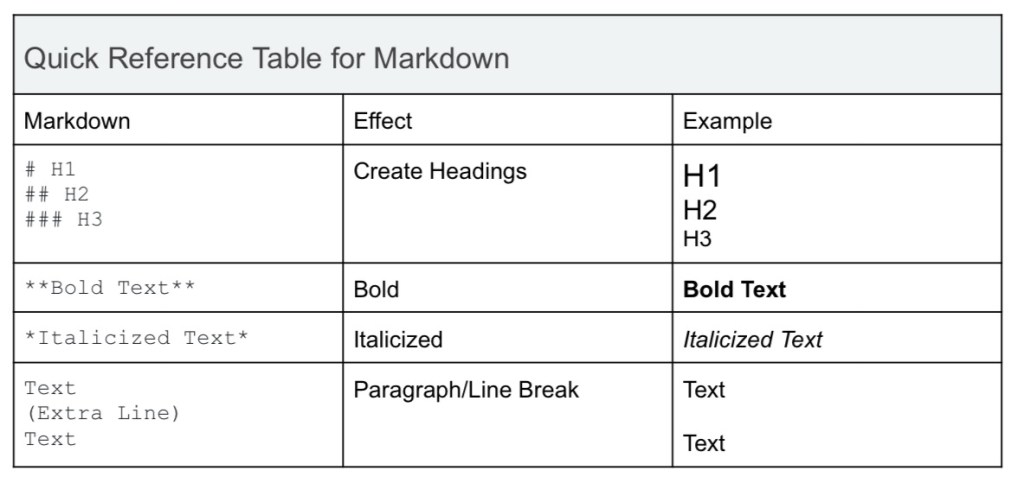
Mini Markdown Cheat Sheet
Tips and Troubleshooting
Formatting & Readability
- Test Markdown with Preview – Before publishing, preview your Markdown.
- Add blank lines between paragraphs – This ensures proper spacing
- Break up large blocks of text – Use headings, lists, and line breaks to improve readability.
Structuring & Organization
- Limit nested lists – Markdown supports nesting, but too many layers reduce readability. Use sparingly.
- Use tables wisely – Markdown tables do not support text wrapping, so keep column text short to avoid layout issues.
- Use comments for collaboration – Add HTML comments to leave notes that will n ppear in the final output, example: <!– This is a comment –>
Troubleshooting Common Issues
If Markdown is not displaying correctly, check these common issues and solutions.

Final Thoughts: Markdown is Simpler Than You Think
Markdown might seem intimidating at first, but once you start using it, you’ll wonder why you didn’t learn it sooner!
Whether you’re writing documentation, editing a README file in GitHub, or just trying to keep your notes clean and organized, Markdown makes formatting fast and frustration-free.
The best way to get the hang of it? Just start typing!
Open a README.md file, play around with headings, bold text, and links, and see how easy it is to structure your content.
📌 Want a deeper dive?
I’ve put together a full Markdown User Guide that includes step-by-step instructions, a complete cheat sheet, and troubleshooting tips to make learning Markdown even easier.
Grab your copy here.
💬 Do you use Markdown in your workflow? What’s your favorite Markdown trick? Drop a comment—I’d love to hear how you use it!
 Pen & Polish
Leave a comment